
Using remote CSV/JSON file to populate departments in Explorer for Institutions
Overview
If your repository doesn’t accurately represent your organization's hierarchical structure, for example you want to limit what departments you can see in the Explorer or you want to use different wording - not to worry. Here at Altmetric we’re able to configure your EFI integration to support reading your departmental structure from an external service rather than taking it directly from your OAI-PMH feed - giving you the freedom and control to see exactly what you want in the way that makes the most sense.
Using this documentation as a guide, you’ll just need to create either a JSON or CSV file that matches our specification and then have it hosted somewhere publicly accessible ready for our system to consume.
The integration supports any HTTPS service which means that you’ll be able to use popular services like Dropbox, Google Drive or your own hosting infrastructure.
The OAI-PMH feed sync is scheduled to run weekly which means that we’ll update your departmental structure at the same time as your research outputs and authors. Any changes to the file will automatically be processed by us and appear within the Explorer the next day.
That’s it - when you’re ready for us to start consuming this new endpoint please contact us to let us know. We’ll then perform a few checks to get things tested before making the changes live.
So whether you are a new client currently in the onboarding stage or you’re an existing one looking to make some changes to your OAI-PMH feed - we’re here to help. If using a CSV/JSON file to populate departments in the Explorer is something that you are interested in please feel free to reach out to us and we’ll be happy to answer any questions.
Schema
JSON
Root object
Property | Required | Description |
hits | Yes | An array of objects containing hierarchical information relating to the organization's departmental structure. |
Hits child object
Property | Required | Description |
name | Yes | The display name used to represent the given department within the Explorer. Tip: This field can be used to rename/correct the name of a department or to translate it to a different language allowing you to have alternative display names in the Explorer compared to that in the repository. |
id | Yes | A unique identifier assigned to the department. Must match the setSpec property value used within the metadata header for records returned in the OAI-PMH feed using the ListRecords verb (except for DiVA). |
parent_id | No | The unique identifier of the parent department. Can be either null or omitted completely if the department has no parent (for example top level departments) and allows for an unlimited department hierarchy. |
CSV
Column header | Required | Description |
name | Yes | The display name used to represent the given department within the Explorer. Tip: This field can be used to rename/correct the name of a department or to translate it to a different language allowing you to have alternative display names in the Explorer compared to that in the repository. |
id | Yes | A unique identifier assigned to the department. Must match the setSpec property value used within the metadata header for records returned in the OAI-PMH feed using the ListRecords verb (except for DiVA). DiVA integrations don’t use the setSpec properties for departments, therefore you must construct and validate your own id system, using only alphanumeric characters (a-z, A-Z, 0-9) with underscores allowed. |
parent_id | No | The unique identifier of the parent department. Can be either null or omitted completely if the department has no parent (for example top level departments) and allows for an unlimited department hierarchy. |
! All headers are required ! All headers must appear in the exact order case as describedIf no parent_id is supplied there must still be a comma after the id field (column count should be three) We recommend quoting values to ensure that the column count remains consistent
Example 1
Below is an example of how a basic ListSet would look when converted to JSON and CSV.
setName | setSpec |
Lilliput University - EMEA | lilliputuniversity-emea |
Faculty of Science | lilliputuniversity-emea:facultyofscience |
Lilliput University - US | lilliputuniversity-us |
JSON
{
  "hits": [
    {
      "name": "Lilliput University - EMEA",
      "id": "lilliputuniversity-emea",
      "parent_id": null
    },
    {
      "name": "Faculty of Science",
      "id": "facultyofscience",
      "parent_id": "lilliputuniversity"
    },
    {
      "name": "Lilliput University - US",
      "id": "lilliputuniversity-us"
    }
  ]
}CSVname,id,parent_id "Lilliput University - EMEA","lilliputuniversity-emea", "Faculty of Science","facultyofscience","lilliputuniversity-emea" "Lilliput University - US","lilliputuniversity-us",
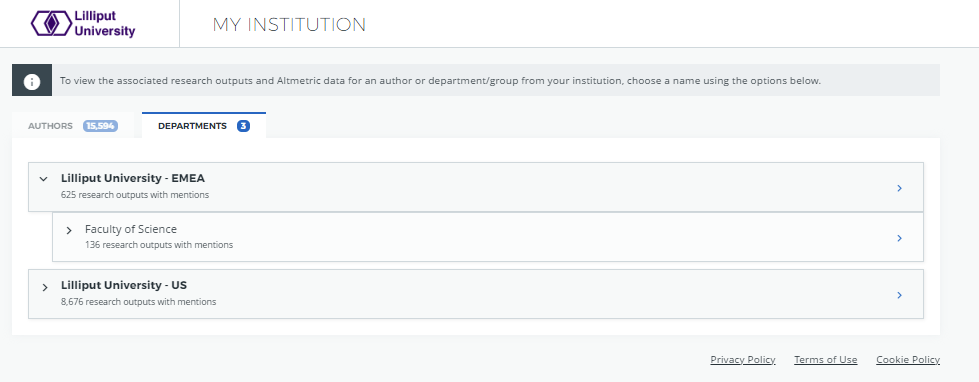
Explorer for Institutions departments view
Below is a screenshot of how this department hierarchy would look when viewed in the Explorer.
Example 2 - DIVA
For DiVA, we obtain the department names from a specific XML tag name type="corporate" authority="abc" associated with paper (where authority matches your institution). Below is an example of how we would convert this into JSON and CSV.
<name type="corporate" authority="tuu" xlink:href="001">
    <namePart>Testa universitet</namePart>
    <namePart>Medicinska fakulteten</namePart>
</name>
namePart | example id |
|---|---|
Testa universitet | tuu_0001 |
Medicinska fakulteten | tuu_0011 |
! Note ! If department translations/renaming or re-mapping is required, substitute the nameParts in the table above with the finalised department names.
JSON
{
  "hits": [
    {
      "name": "Testa universitet",
      "id": "tuu_0001",
      "parent_id": null
    },
    {
      "name": "Medicinska fakulteten",
      "id": "tuu_0011",
      "parent_id": "tuu_0001"
    }
  ]
}
CSV
name,id,parent_id
"Testa universitet","tuu_0001",
"Medicinska fakulteten","tuu_0011","tuu_0001"
Explorer for Institutions departments view
This will create a two level department hierarchy, with Testa universitet as the parent and Medicinska fakulteten as the immediate child department.